One of the greatest challenges of vlogging or having a YouTube channel is visibility. Creating great videos require a lot of work, but with loads of videos created each day, it takes even more work to promote your videos.
With over 3 million videos uploaded on YouTube daily, you need to have an effective strategy for promoting your videos to give them a chance of gaining traction on the platform.
Here we share a few ways you can promote your YouTube channel and boost the visibility of your videos on the platform.
How to Promote your Vlog and YouTube Channel
1. Live Streaming
Live streaming is increasing in popularity and is one great way to promote your Vlog and YouTube channel. You can stream live videos on YouTube, Instagram, Facebook, and many other platforms. This will enable you show activity on your channel and increase engagement with your audience.
You can use live streaming for:
Live Tutorials
Webinar
Questions and Answers Sessions
Product Reviews
You do not need to worry about perfection for your live videos. Part of what makes them interesting is that no one knows for sure how it is going to go from the beginning because everything happens in the moment.
However, if you are shy there are tools like Gyre that offer 24/7 livestream with pre-recorded videos. Just upload your pre-recorded videos to your personal Gyre server, then you can stream the videos on your chosen platform as though it was a live stream. When the video ends, Gyre starts the video from the beginning to create a 24/7 broadcast.
– Advertisement –
2. Post Quality Videos
Another effective way of promoting your YouTube channel or Vlog is to post high quality and interesting videos. Such videos tend to have high engagement, which will give them an edge with the algorithm and lead to more visibility for your videos.
The algorithm of most video sharing platforms is designed to give more visibility to the videos that their audience find interesting. This means that posting high quality videos will enable you find favor with the algorithm, leading to more engagement and visibility for your videos.
You need to understand the interest of your audience in order to create videos that will captivate them and build loyalty so that they will subscribe and return for more.
3. Add Keywords to your Video Title, Description, and Tags
With millions of videos published each day, one effective way to promote your Vlog or YouTube channel is to use keywords to target it the most relevant audience. This will increase engagement and visibility of your videos.
– Advertisement –
By adding keywords in the title, description, and tags, you make your videos visible when people search using those keywords. Your videos can also randomly show up on the video feeds of users who have shown interest in such keywords in the past.
You can use Google’s free keyword planner or the autocomplete feature of YouTube search to find trending keywords that you can use to target your videos to the relevant audience.
4. Create Custom Thumbnails
A good thumbnail can increase interest in your videos. The video thumbnail is one of the first things the viewer sees and if it is attention grabbing, it will increase the chances of users clicking on your video to watch it.
Sometimes the automatically generated thumbnail may not be interesting enough to grab attention. The good news is that video sharing platforms like YouTube have a feature that enables you to choose a custom thumbnail, enabling you choose to best possible thumbnail for the best click-through rate.
On YouTube, you can either take any frame from the video or upload any image from your computer as a thumbnail for your video.
5. Embed Videos on Websites for more Visibility
If you have your own websites, another effective way of promoting your videos is to embed the videos on your website. This works best if the website audience is similar to the target audience of your YouTube channel or Vlog.
Whenever a person visits your website, they will have a chance to view your video. This will increase engagement and result in more visibility.
Promoting your YouTube channel does not necessarily have to cost you anything. It will however require some time and effort. Go through some of the strategies we have discussed in this page and choose the ones that suit your current situation.
Databases are a critical component of applications that power small and large businesses. The information stored in the databases gets frequently retrieved or accessed by applications to meet the demands of the users, who will rely on the output as input into other processes. It is vital to ensure fast access to retrieve records stored in the database within a reasonable threshold.
To ensure that information is readily available when needed, some tasks can be carried out once in the lifetime of an application, and there will be no issues, whereas others must be done regularly for the life span of the application.
One critical activity that falls under a continuous task is database optimisation, and attempting to wrongfully categorise this will lead to disaster in the performance of the application or the database itself.
In this article, I will focus on what optimisation is, optimisation approaches, benefits, and challenges of optimisation. The techniques and examples I will share are all based on some interventions in resolving database performance degradations in my database administration journey.
What is Database Optimisation?
Database optimisation is analysing various database components, including SQL queries and tuning them to improve database performance. It is an iterative process to maximise the speed and efficiency of data retrieval.
It requires collaboration among all the stakeholders (application developers, database engineers, network engineers, and system engineers) to implement the required adjustments that will result in the improved performance of the database.
Most of the database and application setups work efficiently at the initial stage, but as the data grows, the performance may become degraded. The degradation may be in the form of queries running slower, CPU usage spikes, or slow I/O responses. These bottlenecks are signs that regular review and analysis of the database are essential to identify and fix deviations.
– Advertisement –
Database Optimisation Approaches
Several techniques can be adopted in optimising databases for better performance; some of these are as follows:
1. Make use of indexes
Indexes help to improve the performance of queries running on the database by reducing the number of scan, sort, or join operations. It is essential to identify columns used to limit record retrieval in a query and create indexes on such columns to speed up the query execution.
For instance, whenever queries run slowly, you can check the columns specified in the WHERE clause, confirm if they are indexed and if not, create appropriate indexes on them.
It is crucial to note that while indexes will make read operations faster, they can slow down write operations because indexes will be updated whenever changes are made to the tables.
– Advertisement –
2. Data retrieval
In most cases, the scripts that result in database performance degradation were found to be retrieving more records than needed. For example, selecting all the columns in a table when you only need a few columns to meet the requirements of the application module. Reducing the amount of record retrieval per time will reduce the pressure on the CPU and other hardware resources.
3. Batch DML (Data Manipulation) operations
Data manipulation languages include insert, delete, and update; these languages make changes to the records stored in the database, and they must be carefully used to improve database performance.
Making changes, such as deleting or updating a large chunk of data at a time, can take longer to complete, leading to waits by other processes due to the lock mechanism placed on the table to ensure data consistency.
The waits for other processes while making changes to records in a table can be reduced by batching the DML operations instead of carrying them out as a single transaction. Batching long-running activities will save time during rollbacks in the event of disruptions when the query is executing.
4. Database Statistics
The optimiser makes use of the statistics on the table to determine the choice of execution plan to use for queries. If the statistics on the tables are stale, the optimiser may not choose the best
execution plan that will return faster. Not using the best execution plan will not only affect the speed of query execution but will also place much pressure on the hardware resources (CPU, memory, and I/O) of the system. It is a good practice to periodically update statistics on the database objects to ensure the statistics are not at variance with the actual records in the database.
5. Index Fragmentation
Changes to the database, such as deletion, update, and insertion of records, lead to fragmentation of the indexes, which can lead to poor database performance. The best practice is to periodically check the index fragmentation percentage in the database and implement maintenance processes such as index rebuild or reorganisation to remove the fragmentation.
6. Query Optimisation
It involves reviewing and analysing queries running on the database for possible improvements.
EXPLAIN PLAN can be used to understand the query execution plan and where most of the cost lies. Once the highest cost is identified, some adjustments can be implemented, such as re-arrangements of the columns used in the where clause and a review of the use of functions to eliminate bottlenecks.
7. Proper Sizing of Hardware Resources
As the data stored in the database grows, there may be a need to increase the resource allocation to meet the increasing demands. However, increasing the resource allocation every time may not be the solution; rather, it will be necessary to review other parameters to make the right decisions.
In some cases, if the statistics on the tables are not correct, the optimiser can choose an execution plan that seems appropriate based on the available statistics, which may end up causing a CPU spike. It is pertinent always to check that the queries running on the databases are reviewed and tuned to ensure that hardware resources are only increased or decreased based on proven facts.
8. Connection Pooling
It reduces the cost of opening and closing connections by maintaining a pool of open connections that can be passed from one database operation to another. It helps manage and reuse database connections efficiently. The impact of connection pooling may be less evident in small applications than in large ones, and implementing this should be carefully considered.
9. Partitioning
It involves dividing large tables into smaller and more manageable pieces. Query performance can be enhanced by allowing the database engine to work on a smaller subset of data, resulting in faster query execution. If partitioning is properly implemented, it eliminates the need to scan the entire dataset but only the partition of the dataset specified in the query.
10. Data Archiving
This is the process of detecting obsolete data that is no longer required in real time for the program to function properly. Such records can be archived or deleted to reduce the number of records accessed, improving query performance and lowering storage requirements. For example, tables with huge historical datasets or logs should be archived.
Benefits of Database Optimisation
Database optimisation offers several benefits to organisations as follows:
Cost saving: Optimised databases will require fewer resources, reducing the cost of hardware resources.
Improved user experience: Faster data access/retrieval enhances user satisfaction.
Increased query efficiency: Complex queries can execute faster without experiencing delays.
Scalability: Optimised databases can handle more concurrent requests and large volumes of data.
Challenges of Database Optimisation
It is time-consuming: optimising databases requires much time and expertise to identify bottlenecks and proffer solutions.
Complexity: Making multiple adjustments to configurations can create complications in the maintenance of the database system.
Conclusion
Database optimisation is not a one-time event but a continuous activity that must be carried out throughout the lifespan of the database. It involves many considerations to decide which part of the database to tweak, leading to performance improvement or degradation. Setting and having a performance baseline helps to spot any deviation in the performance of the database quickly.
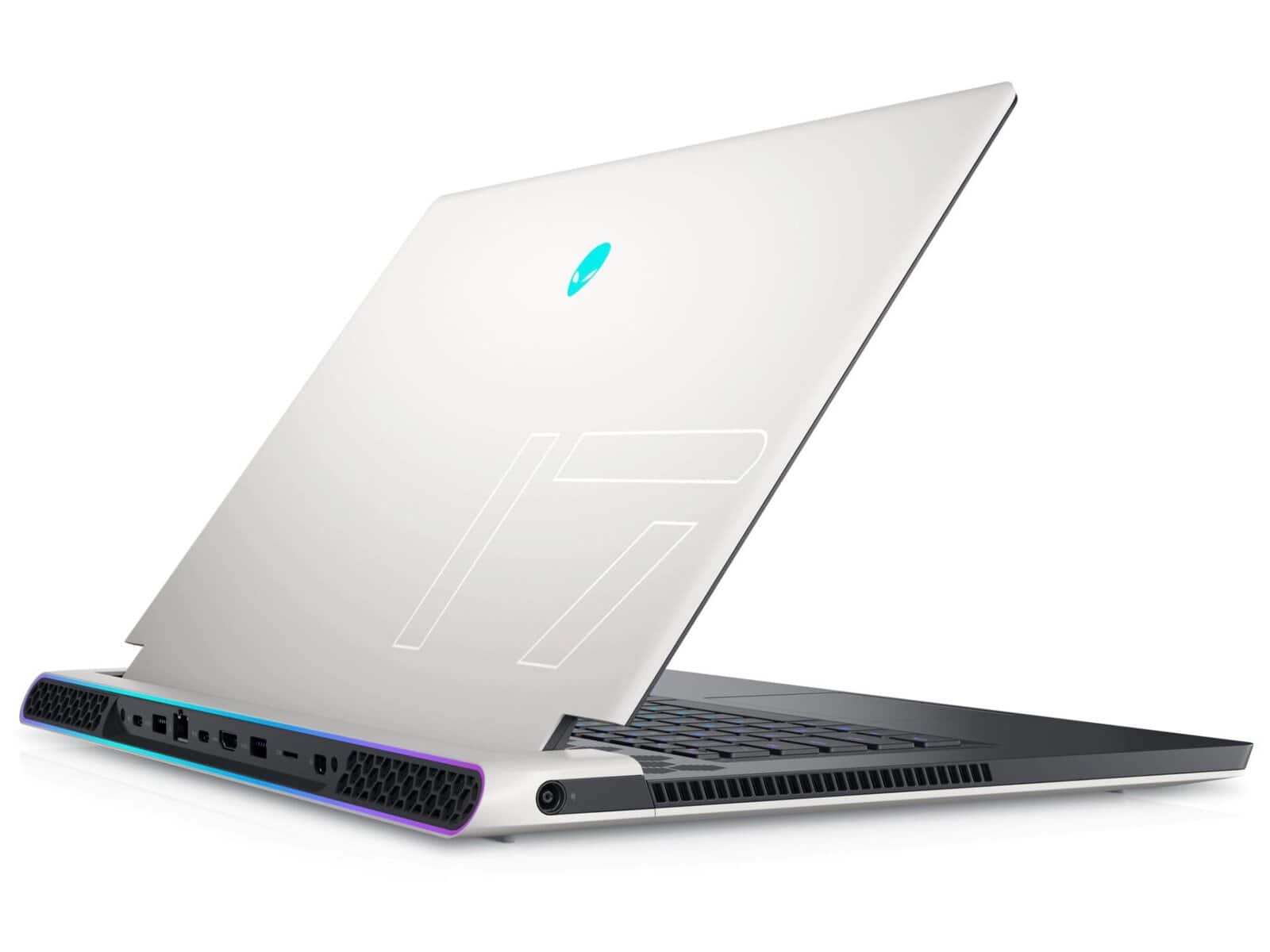
Dell Alienware x17 is the higher variant of the Alienware x15, featuring impressive design, crispy display and powerful processor for maximum performance. The 17-inch display has great display features including 4K resolution, FHD Comfortview Plus NVIDIA G-SYNC Advanced Optimus, 1ms, 300 nits, 360Hz display, thus, enabling for full clarity. It is powered by Intel 11th Gen Core i7 processor coupled with NVIDIA GeForce RTX 3060 Graphics, up to 64GB of Dual-Channel XMP DDR4 memory and 1TB SSD for high-performance action across your favorite games and applications.
Where to Buy Dell Alienware x17
Jumia Nigeria – See Offers | Jumia Kenya – See Offers | Amazon US – See Offers
This laptop also has 720p IR webcam, a full-sized per-key RGB LED AlienFX lighting keyboard with multi-touch gesture touchpad for comfortable gaming. It is packed with a 6-Cell 87WHr Li-Polymer battery, dual stereo speaker, a couple of ports for interface connection and Killer Wi-Fi 6E AX1675 with Bluetooth 5.2 technology for wireless connection.
Dell Alienware x17 Key Features and Specs
Up to 11th-generation Intel Core i7 Processor
Up to Nvidia GeForce RTX 3060 Graphics
64GB DDR4 RAM
Windows 10 Home, 64-bit
17.3-inch FHD (1920 x 1080) or 4K (3840 x 2160) display with 300-nits
Up to 1TB SSD
Dual 4W Stereo Speaker
720p IR camera
Killer Wi-Fi 6E AX1675, Bluetooth 5.2
6-Cell 87WHr Li-Polymer Battery
Design
Similar to the Dell Alienware x15, the x17 has an ultra-thin body with seek finishing. It has slimmer chassis to the old m17 model measuring 0.843 inch in height, 15.718 inch in width and 11.791 inch in length, while weighing 3.02 kg.
Furthermore, thanks to the Alienware design aesthetic, this laptop is lightweight. Around the body are large honeycomb-style cooling vents, above the keyboard, down the sides of the chassis and at the rear which gives the laptop a clean and premium look.
In addition, the Dell Alienware x17 has a 17.3-inch display with thick bezels surrounding it. At the rear surrounding the laptop is also the AlienFX Lighting Zones which is customizable up to 16.8 million distinct colors illuminating around your laptop.
– Advertisement –
While at the dock is the Alienware mSeries Premium AlienFX keyboard, which features per-key RGB LED lighting and anti-ghosting technology. This keyboard has a 1.5mm travel distance between each keys coupled with the N-key rollover technology numberpad, full-size cursor buttons and four dedicated macro keys.
Similarly, the Dell X17 has a 3.1 x 4.1-inch glass precision-point touchpad which performed Windows 10 gestures.
Above all, ports are also positioned at the rear, there are 2 USB 3.2 Gen 1 ports , 1 USB 3.2 Gen 2 Type-C port, 1 Thunderbolt™ 4 port, 1 HDMI 2.1 port, 1 Mini DisplayPort™ 1.4, 1 RJ45 Ethernet port and 1 power adapter port on the left with an headset jack at the right side of the laptop.
Display
Dell Alienware x17 has a large 17.3-inch display with an option of FHD (1920 x 1080) resolution or Ultra HD 4K resolution. The FHD (1920 x 1080) model has two display model; there is one with 165Hz refresh rate with 3ms response time which minimizes motion blur for precision target tracking, thus, allowing you to gain a competitive advantage in fast-paced FPS games.
– Advertisement –
The other FHD model has 360Hz refresh rate with 1ms response time. This Dell Laptop also features NVIDIA G-SYNC and Advanced Optimus for immersive, tear-free, stutter-free gameplay hence, maximizing the gaming performance. Both model however, has the ComfortView Plus feature designed to reduce the amount of blue light emitted from the monitor to optimize eye comfort.
Compare to the FHD model, the 17.3″ UHD (3840 x 2160) model has 120Hz refresh rate and 4ms response time, an anti-glare technology, 100% Adobe color gamut, 500 nits of brightness and wide-viewing angle for immersive, crispy display.
Performance
Dell Alienware x17 equipped with the 11th generation Intel® Core i7 processor offering up to 8 core which clocks at between 2.2 base frequency and 4.6 GHz turbo boost. These CPU is pairing with the all-new RTX 3060 6GB Graphics Card from Nvidia. The new RTX 3000 series GPUs are much faster than the previous Gen RTX Graphic Cards.
The performance of the gaming laptop is also supported by the 64GB of DDR4-3200 RAM and up to 1TB SSD storage, which might be enough for more users.
Above all, as a Windows 10 laptop, Dell Alienware x17 promises the best user friendly experience.
Dell Alienware x17 is equipped with Killer Ethernet to ensure the most important data is delivered fast with 1Gbps of throughput. It also comes with support for the Intel KILLER Wi-Fi 6 with Bluetooth 5.2 for quick and smooth wireless connection.
It also comes with an impressive cooling system. Thanks to the advanced Alienware Cryo-tech, this laptop has creative thermal module designs, heat dissipation, advanced thermal and system control, fan and fan motor design which aids in the cooling system.
Furthermore, Dell Alienware x17 has two upgraded speaker located on the front of the chassis. There are also two array microphones for easy communication during video calls.
Dell Alienware x17 Price and Availability
Dell Alienware x17 price starts at $1,629.99 depending on the configuration of your preferred model.
This laptop is available on Dell’s official store and other third-party e-commerce platforms like Amazon.
“Newtopia” has unveiled a new teaser and stills ahead of tonight’s episode!
“Newtopia” tells the story of Jae Yoon (Park Jung Min), who is serving in the military, and his girlfriend Young Joo (BLACKPINK’s Jisoo) as they race through a zombie-infested Seoul to find each other.
The newly released teaser offers a deeper look into Jae Yoon and Young Joo’s past as a sweet campus couple, setting the stage for their emotional backstory. In a flashback, Young Joo fondly recalls Jae Yoon tying her shoelaces. In the present, however, she now ties them herself, muttering through tears, “You said they’d never come undone.”
The teaser then takes a sharp turn as Young Joo’s group encounters a perpetually drunk college applicant (Tang Jun Sang). Unable to leave him behind, they decide to take him along. Meanwhile, Alex (Lee Hak Joo) watches as the zombies oddly avoid the intoxicated newcomer, prompting him to make a bizarre yet intriguing observation: “You saw how the zombies weirdly avoid him, right? Maybe getting wasted is our last hope to survive,” before he suggests a wild survival tactic—getting drunk.
The newly released stills offer more glimpses into the upcoming episode, showcasing Jae Yoon and Young Joo’s youthful college days, hinting at a deeper exploration of their past. Other images capture a shocked Jae Yoon, soldiers immediately gearing up for battle, and a blood-soaked Young Joo, all pointing to an escalating crisis. Additionally, Tang Jun Sang’s terrified reaction to an unexpected zombie appearance further builds suspense.
Meanwhile, Jin Wook (Kang Young Seok) and Alex brace themselves with serious expressions as they prepare to cut through the zombie horde, reflecting the tension just before their departure for A Tower. The tension peaks as a heavily intoxicated but strangely determined Tang Jun Sang steps onto the zombie-infested streets, raising the stakes on whether Young Joo’s team will successfully navigate the chaos and reunite with Jae Yoon at A Tower.
The next episode of “Newtopia” will air on February 21 at 8 p.m. KST!
While you wait, watch Park Jung Min in “Deliver Us from Evil”:
There are a few things you need to keep in mind when building a web application. Paying attention to them will ensure your visitors get the best possible user experience while on your application.
In this article we take a look at 3 things to consider when building a web application to ensure it offers the solution it was originally designed for.
1. SPA or MPA
One of the key considerations when building a web application is to decide the development approach that best suits your project. You have two main choices in this regard: a Single-Page Application (SPA) and a Multi-Page Application (MPA).
A Multi-Page Application is the traditional way websites were built with each page more or less unique and with a URL that gives access to that particular page.
A Single-Page Application loads a single page and then uses dynamic updates built on technologies like AJAX and client-side JavaScript to update the content of the page based on user interaction.
Answering the SPA vs MPA question for your web application will depend on the specific requirements of your project. MPAs are better for SEO and are more scalable making them great for eCommerce projects and blogs while SPAs are great for applications that perform specific tasks like SaaS solutions and social networks or application where organic SEO is not a priority like closed communities.
2. Security
One of the most important things to consider when building a web application is security. You need to test your application of security vulnerabilities to ensure that your users data is secured at all times.
– Advertisement –
Testing your application will enable you uncover vulnerabilities like SQL injection, cross-site scripting, and other security issues that can make your web application easy to breach for hackers.
Using advanced encryption technologies like AES cybersecurity, you will ensure that user data and traffic on your application are encrypted protecting the service from data breaches.
3. Scalability
When building a web application, it is not easy to know how large the traffic would be. Your web app can gain traction very fast and if you did not prepare for the traffic surge, your application can crash leading to a poor user experience, loss of revenue, or the end of your business.
This is why your web application should be built on scalable technologies and resources. Your application should be hosted on a server where you can easily adjust hardware resources like memory and processing capacity to the needs of the web application.
– Advertisement –
This ensures that when traffic is high you can upgrade to add more resources that will handle the increased demand. This also works the other way, you can reduce resource usage when traffic is low and save some money in the process.
Building a web app can be a bit of a challenge, but with proper planning you will get it right. Before building a web application, you need to ensure you choose the design approach that works best for your application. The security and scalability of the application should also be a top priority.
The 2024 Africa Technology Expo, organized by Spark Africa and now proudly sponsored by Zedi Inc, is set to make a grand entrance in the bursting metropolis of Lagos, Nigeria on the 22nd of June, 2024. Spark Africa, the brilliant minds behind the Africa Startup Festival, partners with Zedi Inc, a dynamic digital marketing and media agency, to bring this event to life.
Dedicated to showcasing the finest in African technology and spotlighting visionary founders, the Africa Technology Expo is focused on solving challenges within the tech ecosystem and exploring the transformative potential of African innovation on the global tech stage.
This event emphasizes bridging the gap between human understanding and technological advancements, a mission closely aligned with Zedi Inc’s commitment to scaling startups and enhancing their growth potential.
This year’s expo is set to feature exhibitions from more than 2300 startups, with the participation of over 50 exhibitors, 6000 attendees, and more than 100 investors. Zedi Inc, alongside other participants, will contribute its expertise and resources.
The event will also include a night mixer, serving as an after-event networking opportunity for attendees, which aligns perfectly with ZedIntro, Zedi Inc’s platform for connecting startups and founders to a network of strategic experts.
Lagos, Nigeria, the acclaimed commercial capital, offers a vibrant and hyper-innovative atmosphere, making it an ideal host for this remarkable event. The city is recognized for fostering numerous African startups, providing the perfect backdrop for the Africa Technology Expo.
– Advertisement –
As an annual flagship event, the Africa Technology Expo, now with the backing of Zedi Inc, brings together tech startups, established tech companies, investors, and tech enthusiasts. It serves as a platform for the inception of groundbreaking solutions, showcases cutting-edge tech products, and fosters collaborative endeavors.
Zedi Inc, with its diverse business arms including Zedi Studios, Hirefoster, Zedi.Ai, and ZedIntro, enhances the event’s mission to propel the African tech ecosystem to unprecedented heights of success and impact.
About The Africa Technology Expo
The Africa Technology Expo is an annual exhibition bringing together tech startups, established tech companies, investors, and tech enthusiasts to showcase innovation, tech products, and solutions. The event also aims to foster collaboration, drive investment, and accelerate the growth of the African tech ecosystem.
The Metaverse Production project has launched Studio PX ANZEN, a LED facility located at FACTORY ANZEN STUDIO RED in Tokyo, established by Dentsu Creative Cube Inc. This studio aims to reduce greenhouse gas emissions and improve video production efficiency using advanced technology. Powered by Brompton Technology LED processing, Studio PX ANZEN is optimized for virtual production filming and is the first studio in Japan to implement the ‘Carbon Calculator for Movie Production,’ a tool that accurately measures CO₂ emissions during video production.
Studio PX ANZEN’s LED display systems feature Brompton 4K Tessera SX40 LED processors, providing outstanding performance and colour accuracy necessary for high-quality virtual production. The main background screen is comprised of ROE Visual’s Ruby 1.5F (1.56mm pitch) panels in a 12m by 4.5m configuration, delivering ultra-high definition at 7,680 pixels wide by 2,880 pixels high. Ambient lighting is provided by ROE Visual Carbon3 Mark II (3.75mm pitch) panels, installed on the ceiling (7.2m by 6m) and sides (1.8m by 3.6m, movable) to provide adaptable, high-brightness illumination.
The studio’s in-camera VFX workflow is supported by disguise vx4+ media servers and rxII rendering servers, as well as stYpe’s RedSpy 3.0 camera tracking, ensuring seamless integration and an immersive production experience. Brompton’s latest Tessera v3.5 software features, such as Dark Time Insertion, build on the company’s patented ShutterSync® technology, allowing users to specify Dark Time within the frame period to reduce motion blur. Additional features like Red Spy Hidden Markers Integration, Custom Markers, Frame Remapping, ChromaTune, and Extended Bit Depth further enhance the studio’s capabilities.
“Collaborating with industry leaders like Brompton Technology allows us to achieve exceptional processing performance and visual quality for virtual production,” says Junichi Imokawa, Director and Managing Executive Officer at Hibino. “By combining their LED video processing technology with our sustainability efforts, including the Carbon Calculator for Movie Production, we are setting a new standard for environmentally conscious video production.”
Elijah Ebo, Brompton’s Director of APAC Operations, adds, “It’s exciting to see Studio PX ANZEN take this important step in measuring CO₂ emissions during video production. Their commitment to sustainability is a significant move for the future of the industry, and we are proud that our LED video processing technology is supporting this innovative facility.”
If you’re in the market for a new laptop and considering one capable of projection mapping, you’ve come to the right place. We’ll look at some of the Best Laptop For Projection Mapping on the market.
Whether you’re looking for something budget-friendly or high-end, we have you covered.
We’ll also provide tips on choosing the right laptop for your needs so; if you’re ready to learn more about projector laptops.
What is Projection Mapping?
Projection mapping is a projection technology that turns objects into a display surface for video projection. This technique is often used in live concerts and theatre productions to create stunning visual effects.
Projection mapping can be used on any surface but is commonly used on irregularly shaped objects. The most common projection mapping is to project onto buildings, often done for advertising purposes but can also be used for art installations and live events.
How to Choose a Laptop for Projection?
When choosing a laptop for projection mapping, there are a few things you need to keep in mind.
The most important thing is ensuring the laptop has the best graphics card, and this is because projection mapping requires a lot of processing power.
– Advertisement –
You also need to ensure that the laptop has a high-resolution display, making it easier to map the projection onto the object.
Another thing to keep in mind is the ports. Make sure that the laptop has the right ports for your projector.
The last thing to keep in mind is the price. Projection mapping laptops can be expensive, so choose one that fits your budget.
5 Best Laptop For Projection Mapping
1. Dell Inspiron 16 5625 Thin and Light Portable Laptop
Amazon price updated: 21st February 2025 1:23 am
Let’s start our list of the Best laptop for projection mapping with the Dell Inspiron’s first-ever machine that we have listed as the top pick of the day. Dell launched this machine back in 2022.
– Advertisement –
The Dell Inspiron has a 16-inch FHD with a 1200p resolution Display. This high-resolution display is perfect for viewing high-quality content and videos. The 100% sRGB color coverage means that colors will appear accurately on your screen.
The screen has a maximum brightness of 300 nits which is plenty bright for most usage scenarios. The laptop also comes with a 100% sRGB color gamut, meaning colors will appear accurate and valid to live.
The Dell Inspiron uses an AMD Ryzen 7 5825U 8-core/16-thread Processor with Radeon Graphics. The processor is powerful and can easily handle even the most demanding tasks. The AMD Radeon graphics card is powerful enough to let you enjoy some of the latest games on medium to high settings.
The Dell Inspiron has 16GB DDR4 RAM that is expandable up to 32GB. The 512GB SSD offers ample storage space for your files and data. The Dell Inspiron also comes with Windows 11 Pro, perfect for business and productivity users.
The Dell Inspiron comes with a Lithium-Ion battery that offers up to 5 hours of usage time. The charger that comes with the laptop is a 65W AC adapter. Also, the Dell Inspiron comes with a handy feature called ExpressCharge.
This feature allows you to charge your device up to 80% in just one hour. A great feature for those who are always on the go and need to charge their device quickly.
The Dell Inspiron has a variety of ports and connectivity options. The SD card reader is great for those who need to transfer data from their camera or phone to their laptop. The USB 3.2 Type-A ports are perfect for connecting external devices such as a mouse or keyboard.
The audio jack can be used for headphones or speakers. The HDMI 1.4 port lets you connect your laptop to an external monitor or TV. The USB 3.2 Type-C with Power Delivery and DisplayPort enables you to connect your laptop to an external monitor or TV and also charge your laptop at the same time.
The dell Inspiron has a 720p HD webcam with an integrated microphone. The camera quality is good enough for video and Skype calls, and the field of view is wide enough to fit two people in the frame.
The microphone is good enough for voice calls and Skype calls, and the integrated speakers are also loud enough to fill a small room.
The Dell Inspiron also comes with Bluetooth for wireless connectivity. The laptop also has a fingerprint reader that adds an extra layer of security to your device.
The Dell Inspiron is a great laptop for projection mapping and comes with all the features you need for a great experience. The powerful processor, large RAM, and expandable storage make it a perfect choice for users who want a machine that can handle anything they throw at it.
Pros
1200p resolution
Low blue light
Thin and Light
Fingerprint reader
Bluetooth, Wi-Fi
Cons
Low-wattage adapter
2. HP Pavilion FHD Projection Laptop
Amazon price updated: 21st February 2025 1:23 am
HP, with its Pavilion Projector, is the runner-up of this detailed guide, and this is the exclusive laptop from their house in this list. It is one of the best gaming laptops with a powerful processor and discrete graphics.
The HP Pavilion features a 15.6-inch Full HD IPS anti-glare WLED-backlit display with a screen resolution of 1920×1080 pixels. The micro-edge bezels create an immersive viewing experience, while the anti-glare panel lets you enjoy your games and movies even in brightly lit rooms.
HP Pavilion’s display is bright for indoor use and can even be used outdoors on a sunny day. The maximum brightness we measured was 300 nits, brighter than the average laptop.
The HP Pavilion has a 72% NTSC color gamut on the lower end for a gaming laptop. It can’t display as many colors as some of the other laptops on this list; however, the colors it can display are accurate. We measured an average Delta-E of 2.7, which is excellent.
The HP Pavilion has 16GB of RAM and a 1TB HDD+256GB SSD, which is more than enough storage for most games and programs. The HP Pavilion also has a backlit keyboard and a B&O audio system.
The GeForce GTX 1650 is a good graphics card for 1080p gaming, and it can run most games on high or medium settings at 60 FPS. However, some games may require you to lower the settings to maintain a stable frame rate.
This laptop comes with a 3rd Gen Ryzen 5-4600H Processor. The processor is an ultra-low-voltage platform, and Hexa-core, twelve-way processing provides maximum high-efficiency power.
The processor is powerful and lets the user enjoy smooth multitasking, gaming, projection, and other activities without lags.
The HP Pavilion has a 3-cell Lithium-ion polymer Battery with a capacity of 41 Wh. The laptop’s battery life is low and will last for around 2 to 3 hours on a single charge with mixed usage.
The HP Pavilion has two USB 3.0 Type-A ports, one USB 3.0 Type C port, one HDMI port, and one multi-format SD media card, reader. The laptop also has a headphone/microphone combo jack.
The webcam quality is good, and the audio is acceptable. The webcam has a decent field of view and can be used for video chatting and conferencing. The audio quality is not very good.
The HP Pavilion has a backlit keyboard with an integrated numeric pad. The keys are well spaced and have a good travel distance, and the keystroke is soft and quiet.
The trackpad is big and supports multi-touch gestures. The trackpad is responsive and accurate.
The HP Pavilion is a good laptop for projection, gaming, and general use. It has a powerful processor, a discrete graphics card, a backlit keyboard, and a good display. The battery life is low, and the audio quality could be better.
Pros
Affordable
Backlit keyboard
Wireless-AC + Bluetooth
Up to 1TB
Best for and projection
Cons
Low battery life
3. ASUS ROG M16 Laptop For Gaming and Projection
We have covered the Asus ROG M16 by adding other brands to the list. The M16 is a powerful projection laptop with impressive hardware, and the design is also very simple and beautiful.
The ASUS ROG M16 gaming laptop features a 16-inch Wide UXGA display with a 144hz refresh rate and a resolution of 1200p, making it perfect for gaming and other high-resolution activities. The display also has an impressive color palette, allowing you to enjoy your favorite games and movies in true-to-life colors.
The ASUS ROG M16 gaming laptop is powered by an Intel Core i7-11800H 2.3GHz Processor that can be boosted up to 4.6 GHz. It also features an Nvidia RTX 3050 Ti 4GB GDDR6 Dedicated Graphics card that is VR Ready. And allows you to enjoy your favorite games and movies in true-to-life colors.
The ASUS ROG M16 gaming laptop comes with 16GB of DDR4 RAM and a 2TB PCIe NVMe M.2 SSD for storage. And this gives you plenty of space to store your games, movies, and other files.
The ASUS ROG M16 gaming laptop has a 180W power supply and a 4-Cell 90 WHr Battery. And gives you plenty of power to game and do other activities without worrying about running out of battery.
The ASUS ROG M16 gaming laptop also has an RGB backlit keyboard, allowing you to game and type in the dark. It also has an HD webcam to video chat with your friends and family.
Asus M16 has a wide variety of ports that allow it to connect to nearly any device you could want to use. There is an HDMI port and a Thunderbolt 4 port for video. For audio, there is a headphone/microphone combo jack. For data, there is a USB 3.2 Type-C Gen2 port and a MicroSD card reader.
The ASUS ROG M16 gaming laptop also has Wi-Fi 6 and Bluetooth 5.2 for wireless connectivity.
The ASUS ROG M16 gaming laptop is an excellent choice for gamers, movie lovers, and projection alike. It has the power to handle any game you throw at it and the visuals to make your favorite movies look their best. If you are looking for a projection laptop that can do it all, the ASUS ROG M16 is the one for you.
I know Gigabyte is not a famous brand; what body cares if it’s popular or not? We should only be concerned with our situations. If the laptop is performing well, this is more than enough. The Gigabyte Aero 15x is the best-performing laptop.
The Gigabyte FHD 144Hz Pantone X-Rite 1080p HD IPS anti-glare 15.6 inches display LCD. This HD display is designed for projection and other demanding tasks.
GIGABYTE Aero has 16 GB of DDR4 RAM and a 512 GB M.2 NVME PCIe SSD. The 16 GB of RAM will allow you to multitask easily, but the 512 GB SSD is not enough space for your projection videos and other files.
The Aero 15x laptop also has an NVIDIA GeForce GTX 1070 graphics card. And the card will allow you to game on high settings and enjoy smooth visuals. The GTX 1070 is also great for video editing and other graphics-intensive tasks.
The GIGABYTE Aero 15x projection laptop is powered by an Intel Core i7-8750H processor. And this is a powerful processor that will allow you to multitask with ease and handle demanding tasks.
The GIGABYTE Aero comes with a 94.24Wh 8hrs long battery life. And this is a great feature for those who want to game or use their laptop for long periods. This laptop also comes with a Gigabyte Fusion per-key RGB keyboard, and this keyboard is backlit and offers a great gaming experience.
The Aero 15x has various ports, including HDMI, Mini DisplayPort, 3 USB, Thunderbolt, SD card reader, Audio jack, Kensington lock, and RJ45. That gives you various options for connecting your laptop to other devices.
The Aero 15x is a great laptop for projection and other demanding tasks. It has a powerful processor, a great graphics card, and plenty of RAM. You can always add an external hard drive or SSD if you need more storage.
Pros
144Hz
1080P resolution
Metal chassis
Long battery life
Cons
512GB space
5. HP Pavilion 15 Best Touchscreen Laptop For Projection
With the second HP Pavilion laptop in 2021, let’s conclude this list of the best laptops for projection mapping. Like other laptops on this list, the Pavilion has several versions we will not discuss here.
The 1080p resolution of this HP 15.6-inch touch screen laptop is full HD and offers crisp and clear visuals. The micro-edge display gives you more screens to work within a smaller footprint.
The Integrated Intel UHD graphic card is the best in the business and offers you a great deal of projection performance for all your needs. Whether you want to use this laptop for work, play, or both, the UHD card will not disappoint.
The Pavilion also has a backlit keyboard, making it easy to see in low-light conditions and perfect for working in dark rooms. The natural finger-touch navigation makes the most of Windows 10, making it a great choice for those who want an easy-to-use laptop.
HP Pavilion 15 laptop comes with the Intel Core i5-1035G1 10th Generation Processor. And this is an eight-way processing unit with a base clock speed of 1.0 GHz and can go up to a maximum of 3.6 GHz. The Intel Core i5-1035G1 is based on the Coffee Lake Refresh architecture and is manufactured using a 14nm process; it has six cores and eight threads.
The processor is supported by a 16GB DDR4 SDRAM with a clock speed of 2666 MHz. A dual-channel memory support system that is expandable up to 32GB. The HP Pavilion 15 laptop has a 512GB PCIe NVMe M.2 Solid State Drive for storing data. This drive is faster than a standard hard disk drive and offers quick data access.
The HP Pavilion 15 laptop has a 3-cell fast-charge lithium-ion battery, and this battery gives you up to 5 to 8 hours of usage on a single charge. The HP fast charge feature allows you to charge the battery up to 70% in just 45 minutes.
This projection laptop has all the necessary ports for different types of connections. You will find an HDMI port, a USB Type-C port, and a USB Type-A port. Also, you will find an SD card reader, a headphone/microphone combo jack, and an RJ-45 port. These ports give you various options for connecting to different devices and peripherals.
The Pavilion projection laptop also comes with a 720p HD webcam. This webcam is integrated into the laptop’s bezel and gives clear and sharp images. And the B&O audio system gives you rich and clear sound, and this speaker system is perfect for working from home or attending online classes.
The HP Pavilion is a great choice for those who want a powerful and versatile laptop that is easy to use. With a backlit keyboard, touch screen, and UHD graphics, this laptop has everything you need to do the job.
Pros
Touchscreen
Affordable
Wi-Fi & Bluetooth
Webcam
Average battery life
Cons
Low space storage
Conclusion
So now, we’ve compiled a list of some of our favorite tools to assist you in getting started on your project. The ASUS ROG M16 or GIGABYTE Aero 15X would be great if you’re looking for a high-end option. Or, if you’re on a tighter budget, the HP First Pavilion 15.6″ is a great option. Whichever laptop you choose, make sure to consider the features that are most important to you.
MBC’s drama “Undercover High School” has shared new stills ahead of tonight’s premiere!
“Undercover High School” is a comedy action drama that follows Jeong Hae Seong (Seo Kang Jun), a National Intelligence Service (NIS) agent who goes undercover as a high school student to track down Emperor Gojong’s missing gold.
In tonight’s first episode, NIS agent Jeong Hae Seong infiltrates the prestigious private school Byeongmun High School to uncover its secrets.
The newly released stills capture Hae Seong’s seamless transformation into a high school student. However, his first day at Byeongmun High School is anything but smooth. From the get-go, he finds himself being dragged around by his homeroom teacher Oh Soo Ah (Jin Ki Joo), hinting at an extraordinary first encounter between the two.
Upon entering the school, Hae Seong immediately switches to agent mode, scanning his surroundings for clues. He soon stumbles upon an old, suspicious-looking building, prompting him to take pictures. Sensing something unusual, he reports his findings to his team leader Ahn Seok Ho (Jeon Bae Soo), urging a deeper investigation.
Amid escalating tension, Hae Seong quickly finds himself entangled with troublemakers. Unable to avoid the confrontation, he responds to their taunts while struggling to suppress his well-honed combat instincts. With chaos following him from day one, how will Hae Seong navigate the challenges of his double life?
“Undercover High School” premieres on February 21 at 9:50 p.m. KST and will be available to watch on Viki.
Watch teasers for “Undercover High School” with English subtitles below:
Hive, a manufacturer specialising in media control solutions, will introduce its Nucleus media player at Live Design International (LDI) 2024, taking place from 8-10 December in Las Vegas. The Nucleus is a 1U rack-mountable media player designed to offer an affordable and scalable solution for live events and fixed installations. Hive will be exhibiting alongside its exclusive distributor, Show Sage, at booth 2123, where attendees can view product demonstrations and explore the Hive ecosystem.
The Nucleus media player features a 1U rack-mountable chassis and is equipped with dual SDM sockets, compatible with Hive’s Beeblade computing modules, including Minima, Osmia, and Pluto. These modules are designed to provide advanced capabilities typically found in more expensive media servers, delivering a cost-effective solution for media playback in demanding environments.
The Nucleus is built with a machined aluminium chassis, offering durability suitable for both touring and fixed installations. It has been used in a range of high-profile events, including live music tours and festivals such as Rita Ora, TEMS, and Electric Picnic, demonstrating its performance in both creative and technical applications.
Designed for ease of use and flexibility, the Nucleus integrates easily into control room setups while remaining portable for live event use. Positioned between Hive’s compact Beeblade modules and the larger Beehive system, the Nucleus offers a scalable solution for AV professionals.
Hive’s founders Dave Green, Trey Harrison, and Mark Calvert will be joined by Sales Director Nigel Sadler and Business Development Consultant Sarah Cox at LDI 2024 on booth 2123. Together, they will engage with attendees, provide live demonstrations, and answer questions about the Nucleus and the Hive ecosystem.
Hive will be exhibiting in partnership with Show Sage, a specialist in media-server and control solutions, and Hive’s exclusive distributor for the USA and Canada. Show Sage’s expertise and well-established network play a key role in introducing Hive’s technology to local customers and ensuring seamless customer support.
“We are thrilled to debut at LDI and launch Nucleus, which represents a significant leap forward in accessible media playback technology,” said Mark Calvert, Co-Founder and Managing Director of Hive. “Our partnership with Show Sage enables us to connect with customers across the U.S. and Canada, and we’re excited to showcase our solutions through live demos and training at this leading industry event.”